From “It Crashed Again” to “I Know Why”
Ever had that experience? Your device has an annoying problem, forum discussions go in circles, but nobody really knows the answer. You think: “Can I figure this out myself?”
This is my story with the ClockworkPi uConsole. A pocket-sized Linux computer, clamshell form factor, mechanical keyboard, fits in your backpack - a hacker’s dream. But it had a critical problem:
Enable 4G module + battery power = random system freeze
The only fix? Remove battery, restart. Repeat.
Vibe Coding Begins: Coffee Shop + Portable Device + Curiosity
One weekend afternoon, sitting in a coffee shop, staring at my crashed uConsole again, I had a thought:
What if I build the diagnostic tools directly on this device? No waiting to get home, no desktop workstation - just here, using the device experiencing the problem to solve its own problem.
Sounds a bit crazy, but also fun. So I started.
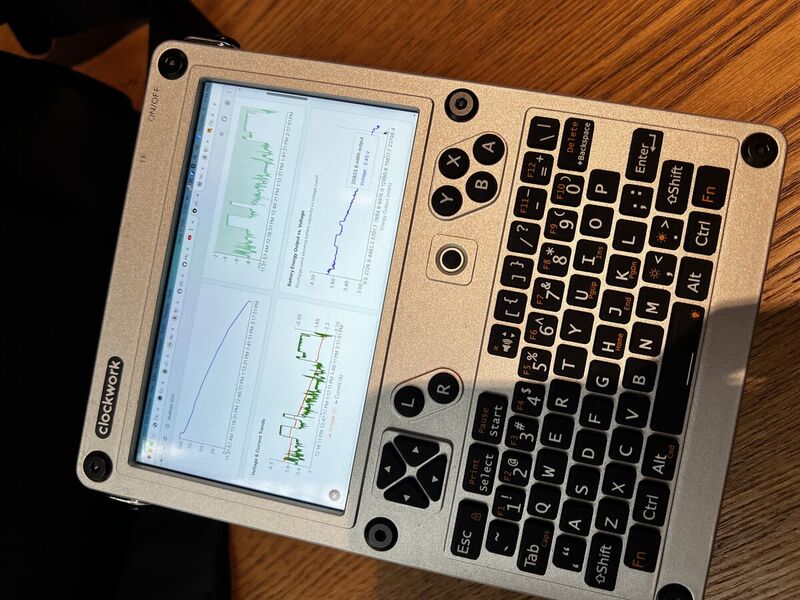
Building the solution on the device experiencing the problem - true vibe coding in action
The Toolkit Was Simple
- The uConsole itself (on battery power, running Ubuntu)
- Claude Code (AI-assisted development, letting me focus on problem-solving instead of syntax details)
- Next.js + TypeScript (rapid prototyping, hot reload, instant feedback)
- A cup of coffee (essential!)
No complex lab equipment. No expensive oscilloscope. Just these.
The Joy of Building: Real-time Monitoring → Problem Discovery
Step one: I need to see what’s actually happening to the battery.
| |
Minutes later, a simple web interface appeared:
- Real-time voltage
- Real-time current
- Real-time power
- Real-time battery percentage
Live-updating charts dancing in the browser. I enable the 4G module, watch the screen…
Voltage dropped! From 3.7V straight down below 3.4V.
“Wait, this isn’t a power issue, it’s a voltage issue!”
Following the Trail: Datasheets Don’t Lie
After some searching, I found the SIM7600G-H 4G module specs:
- Operating voltage range: 3.4V ~ 4.2V
- Minimum safe voltage: ~3.45V
- Peak current: up to 2A during transmission
The mystery solved:
- 4G module suddenly draws 2A current
- Battery internal resistance causes voltage to sag instantly
- Voltage drops below 3.45V → module brownout
- USB bus hangs → system freeze
- Only battery removal resets it
Key insight: It’s not about battery capacity, it’s about voltage dropping too fast.
The Deeper Discovery: Half Your Battery Is Unusable
I dug deeper, running a complete discharge test:
- From 100% to nearly 0%
- Recording voltage, current, energy every second
- Total of 4,318 data points over 2 hours 48 minutes
Then I plotted: Energy Output vs Voltage, with a red line at 3.45V.
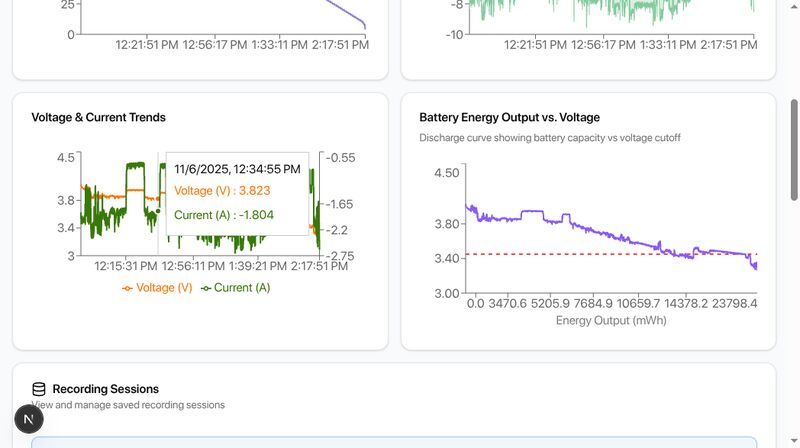
The red line shows the 4G module’s minimum voltage. Everything to the right is unusable for 4G connectivity.
The shocking result:
- Total battery capacity: 24.79 Wh
- Usable above 3.45V: 13.39 Wh (54%)
- Unusable below 3.45V: 11.40 Wh (46%)
In other words: For reliable 4G operation, you can only use about half your battery capacity. The remaining 40-50%? Still there, but useless for 4G.
Complete Discharge Data
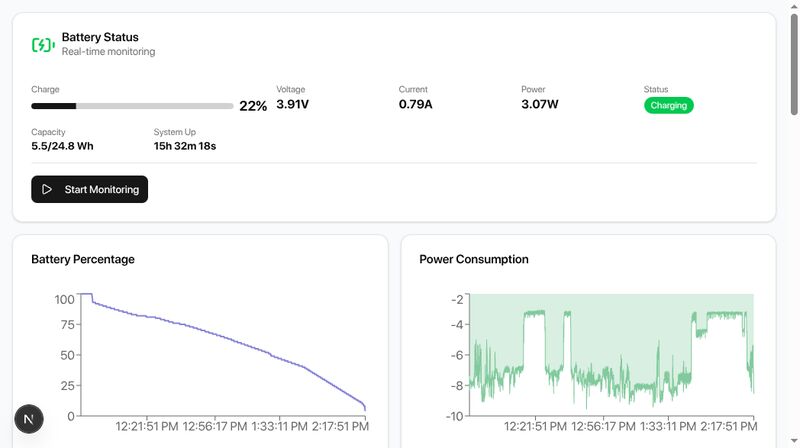
Complete discharge curve from 100% to ~2%
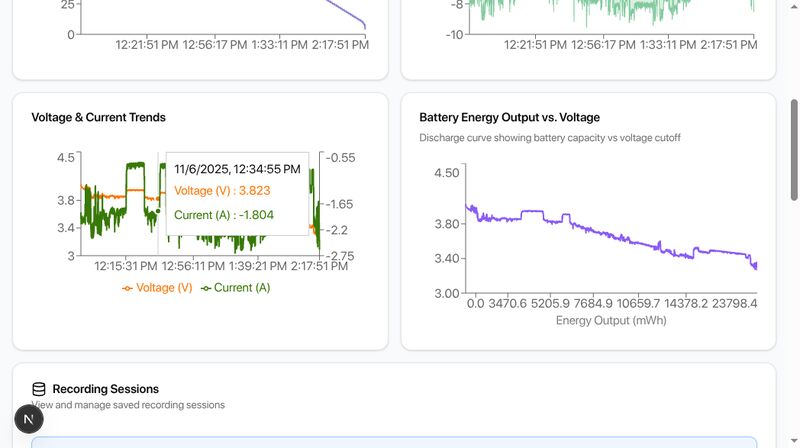
Voltage drop and current spike patterns
The Solution: Smart Power Management
With the root cause identified, the fix became obvious:
Reduce current draw → Less voltage sag → Stay above 3.45V
I wrote an automated script:
- Detect when 4G module is active
- Detect when running on battery
- If both true: Reduce CPU frequency to 1.8GHz (from 2.4GHz)
- Lower power = less current = stable voltage
Test results:
| |
Problem solved!
Why This Is Vibe Coding
Looking back, what excites me most isn’t just solving the problem (though that’s great), but the process itself:
Zero Context Switching
- Problem is on this device
- Solution is built on this device
- Testing runs on this device
- Everything in one place, one moment
Instant Feedback
- Change code → Save → Browser auto-refreshes → See results
- From idea to validation in seconds
- No compile wait, no deployment steps
Location Freedom
- Coffee shop
- Park bench
- On the train
- On the couch
Anywhere with WiFi and power (or a charged battery), becomes your lab.
AI-Assisted Joy
- Claude Code helps scaffold quickly
- No wrestling with syntax details
- Focus on the problem essence
- Faster iterations, more experimentation
This Isn’t Just for Programmers
Ten years ago, solving this would require:
- An engineering lab
- Thousands of dollars in test equipment
- Cross-compilation toolchains
- Days of setup time
Today? A $200 pocket computer and one focused weekend.
This means more people can:
- Tinker with battery-powered projects
- Debug hardware issues
- Test and compare battery performance
- Fix device problems on-site
- Learn by building, see results immediately
The barrier to DIY problem-solving just collapsed.
Open Source, Try It Yourself
The entire project is open source (GPL v3):
Repository: battery-monitor
Quick Start:
| |
What you get:
- Real-time battery monitoring dashboard
- Voltage/current/power charts
- Discharge curve analysis (Energy vs Voltage)
- 3.45V threshold visualization
- Smart power regulator (auto frequency scaling)
- Session recording and data export
The Joy of Building
Building the solution on the device experiencing the problem - there’s something special about that.
No “I’ll fix this later.” No “when I have time.” Just now, right here, solving it directly.
The uConsole now runs stably on battery with 4G active. The community understands why some batteries work better. The entire solution was built in one fun weekend.
This is Vibe Coding:
- With curiosity
- When inspiration strikes
- Wherever you’re comfortable
- Using modern tools and AI assistance
- Building what you need
Not because you must, but because you can, because it’s fun.
The tools exist. The hardware is affordable. AI assistants are ready.
The only question is: Are you ready to start your Vibe Coding journey?
Community Impact
Share Your Results:
- Test your batteries with the discharge curve tool
- Share findings in forums
- Help build the community battery database
Questions? Want to contribute?
- ClockworkPi Forum: https://forum.clockworkpi.com/c/uconsole
- Gitea Issues: https://hiwifi.denq.us:8418/denq/battery-monitor/issues
This article is part of the Vibe Coding Fun Series, documenting real projects built on portable devices. Follow along to see what happens when development becomes truly mobile.
Coming next: Generating travel posters with AI in five minutes at a coffee shop
License: GPL v3
Project link: battery-monitor on Gitea