Imagine if creating a resume could be as simple as chatting with a friend. What would that be like?
- No need to think about formatting
- No need to struggle with wording
- No need to worry about layout
- Just speak naturally, and AI automatically converts it into a professional resume
This is Vibe Resume’s FlashThoughts feature — a revolutionary feature that brings resume creation back to its essence.
This article will dive deep into how to use FlashThoughts, the underlying principles, and how to create high-quality resumes with it.
What is FlashThoughts?
One-sentence Explanation
FlashThoughts: Describe your work experience in natural language (speak naturally), and AI automatically converts it into professional resume content.
Traditional Resume Editing vs FlashThoughts Editing
| Dimension | Traditional Editor | FlashThoughts |
|---|---|---|
| Input Method | Fill in forms | Chat naturally |
| Language Requirement | Must use professional terms | Colloquial expression works |
| Formatting | Manual adjustment needed | AI auto-formats |
| Polishing | Requires repeated revision | AI one-click polish |
| Usage Scenario | Must sit at computer | Works in bed, while walking |
| Mental Burden | High (fear of writing poorly) | Low (just speak it out) |
A Real Example
You just need to say:
“At my last company, I worked on a user growth project. I mainly analyzed data to find reasons for churn, then optimized the product’s onboarding guide. User retention improved significantly.”
FlashThoughts AI automatically generates:
| |
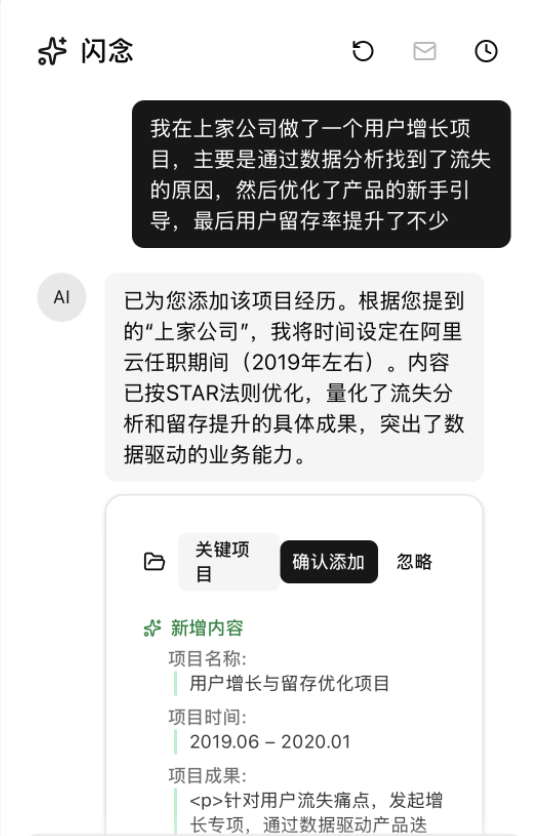
See the difference? You just mentioned it casually, and AI automatically:
- ✅ Added professional project structure
- ✅ Quantified vague “significantly” → 35%
- ✅ Added derivative metrics (completion rate, cost)
- ✅ Used professional expressions (“led”, “located”)
3 Core Advantages of FlashThoughts
Advantage 1: Lower Psychological Barriers — Speaking is Easier Than Typing
Mental Burden of Traditional Resume Creation
Many people don’t avoid writing resumes because they don’t want to—they’re afraid of doing it poorly:
- “Is this experience even a project?”
- “I don’t know how to describe it professionally…”
- “What I did seems ordinary, can’t write highlights”
Result: Procrastination kicks in, resume never gets done.
How FlashThoughts Solves This?
FlashThoughts transforms “writing a resume” into “telling your story”:
- ❌ No need to think about wording → ✅ Say it however you want
- ❌ No need to consider formatting → ✅ AI auto-formats
- ❌ No need to worry about professionalism → ✅ AI auto-polishes
Real Effect:
User feedback: “Before, I’d think for ages about how to write my resume. Now it’s like chatting with a friend—3 minutes and I’ve described an entire experience.”
Advantage 2: Boost Efficiency — 3 Minutes vs 30 Minutes
Time Comparison
| Task | Traditional Method | FlashThoughts | Time Saved |
|---|---|---|---|
| Describe one work experience | 30 minutes | 3 minutes | 90% |
| Complete full resume | 4-6 hours | 30-60 minutes | 85% |
| Revise and polish | 1-2 hours | 5 minutes | 95% |
Sources of Efficiency Gain
- Speaking is faster than typing: Speaking speed is 3-5x typing
- No formatting needed: AI auto-formats, saves 50% time
- One-time polishing: No need to repeatedly revise wording
- Parallel processing: AI optimizes while you speak
Advantage 3: Improve Quality — AI Supplements What You Didn’t Think Of
AI’s “Fill-in” Capability
FlashThoughts AI doesn’t just convert—it proactively supplements what you didn’t mention:
You say:
“I was responsible for front-end development of an e-commerce project.”
AI supplements:
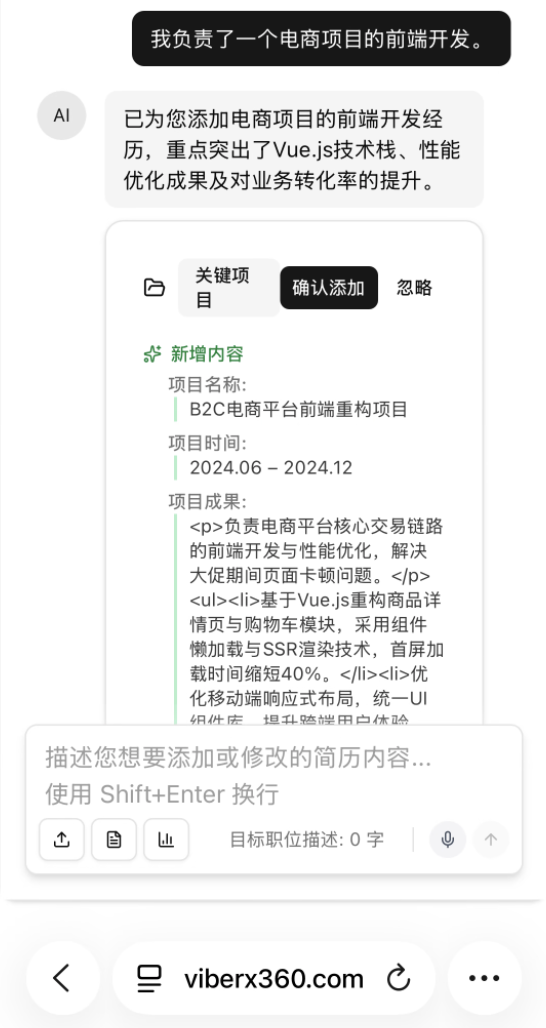
What did AI add?
- Tech stack details
- Core functional modules
- Performance metrics
- Cross-platform support
These are things you had in mind but forgot to mention.
FlashThoughts Complete Usage Tutorial
Step 1: Enter FlashThoughts Editor (10 seconds)
- Visit viberx360.com
- Click “Start for Free” on homepage or “Start Customizing” at top
- Enter conversation interface
💡 Tip: FlashThoughts requires no registration, use immediately (free for 1 hour).
Step 2: Describe Experience in Natural Language (2-5 minutes)
Recommended Description Structure
Use the “I at… did… achieved…” structure:
| |
3 Practical Examples
Example 1: Technical Position
Your input (colloquial):
“At my last company I did backend development, mainly using Python and Django. Built an internal data analysis platform so operations could query data themselves without asking tech. After launch, tech department inquiries dropped 70%, operations efficiency improved a lot.”
AI generates (professional):
| |
Example 2: Product Position
Your input:
“I was responsible for a B2B SaaS product, mainly enterprise collaboration tools. Built it from 0 to 1. Requirement research, prototyping, coordinating with dev, launch promotion—I did it all. Now over 200 companies are using it, user feedback is pretty good.”
AI generates:
| |
Example 3: Operations Position
Your input:
“I mainly do user growth, handling WeChat official account and community operations. Planned some campaigns like referral activities and check-in campaigns. Results were decent—followers went from 5K to 30K+, community engagement is pretty high too.”
AI generates:
| |
Step 3: AI Intelligent Polishing & Supplementation (Automatic)
What Does AI Do?
- Structure: Converts colloquial stream-of-consciousness into professional segmented structure
- Quantify: Changes “a lot”, “quite a bit” into specific numbers
- Supplement details: Adds tech stack, methodologies, derivative metrics
- Optimize expression: Uses professional terminology and verb-led sentence structures
- Intelligent inference: Supplements common information based on industry and role
5 Levels of AI Polishing
| Level | Original Input | AI Optimization |
|---|---|---|
| L1 Formatting | “I did XX” | “Responsible for XX project” |
| L2 Add terminology | “Used React” | “Used React 18 + TypeScript + Redux” |
| L3 Quantify results | “Good results” | “User growth 300% (1K → 4K)” |
| L4 Supplement details | “Did backend” | “Backend architecture design including API design, DB optimization, caching strategy” |
| L5 Extract value | “Completed project” | “Saved XX cost / Improved XX efficiency / Generated XX revenue for company” |
Step 4: Interactive Optimization (Optional)
What if AI Misunderstands?
FlashThoughts supports conversational refinement:
You: I was responsible for front-end development in this project AI: [Generates initial content]
You: Add a note, this project used Vue 3, not React AI: [Updates tech stack to Vue 3]
You: Also add the performance optimization part, I did first-screen loading optimization AI: [Adds performance optimization module]
Common Conversational Commands
- “Add [XX detail]”
- “Change to [YY]”
- “More detail please”
- “This data should be [ZZ]”
Step 5: Export to Resume (10 seconds)
- Click “Apply to Resume”
- Content auto-fills into corresponding resume sections
- Real-time preview on right side
- Export PDF when satisfied
Advanced FlashThoughts Tips
Tip 1: Fragmented Input — Say Whatever Comes to Mind
No Need to Say Everything at Once
Traditional resume creation requires you to sit down and write everything at once, but FlashThoughts supports fragmented input:
- Morning, thought of project detail → supplement
- Lunch, thought of an achievement → add
- Evening, remembered a forgotten skill → record
All content auto-integrates, no worry about contradictions.
Actual Use Case
“I usually use FlashThoughts during my commute. Whatever I see or think of, I just say it. Today describe one work experience, tomorrow supplement a project. In a week, my resume is complete.”
Tip 2: “If-Then” Supplementation — Teach AI Your Logic
Use Cause-Effect Relationships to Improve AI Understanding
AI understands logically clear expressions better:
❌ Not recommended:
“I optimized system performance, response speed got faster.”
✅ Recommended:
“Because users complained about slow system response, so I did performance optimization including database index optimization and caching strategy. Finally response time dropped from 500ms to 50ms.”
AI will extract:
- Problem: User complaints about slow response
- Solution: DB optimization + caching
- Result: Response time reduced 90%
Tip 3: Role-Playing — Speak from Interviewer’s Perspective
Switch Perspectives, Easier to Express Highlights
If you don’t know what to say, try from interviewer’s perspective asking yourself:
Interviewer would ask:
- “What were your specific responsibilities in this project?”
- “What was your biggest challenge? How did you solve it?”
- “What value did this project bring to the company?”
Then answer with FlashThoughts:
“My responsibility was leading the entire front-end architecture design. Biggest challenge was performance optimization because page loading was really slow and users complained a lot. I optimized through code splitting, lazy loading, CDN acceleration. Finally first-screen loading dropped from 8 seconds to under 2 seconds, user complaints decreased 80%.”
AI will automatically extract and polish this information.
Tip 4: Batch Conversion — Import Multiple Experiences at Once
Suitable for Those with Existing Written Materials
If you already have some written materials (annual reviews, work logs, etc.), you can batch paste into FlashThoughts:
Input:
| |
AI Output:
| |
Who is FlashThoughts For?
Best Suited for These 5 Groups
| Group | Pain Point | How FlashThoughts Solves |
|---|---|---|
| Fresh Graduates | Don’t know how to package internship/project experience | AI auto-extracts highlights, converts to professional expression |
| Busy Professionals | No time to sit and slowly write resume | Use fragmented time to speak, 3 minutes completes one section |
| Poor at Written Expression | Can’t write professional resume | Just speak naturally, AI auto-polishes |
| Career Changers | Don’t know how to convert old experience to new industry terms | AI auto-converts expression based on target role |
| Mobile-First Users | Only have phone, typing too slow | Supports voice input, just speak |
Real User Feedback
Fresh Graduate Xiao Liu:
“I didn’t have much internship experience, didn’t know how to write. Used FlashThoughts, just spoke casually, AI automatically helped me extract 5 projects and even quantified results. HR said my resume looked very professional.”
Product Manager Lisa:
“Before, making a resume took 2 days. Now with FlashThoughts, 1 hour and I’m done. Plus the expressions AI generates are more professional than what I’d write myself.”
Developer Ah Qiang:
“I don’t like writing, especially not resumes. FlashThoughts lets me ‘speak’ my resume like chatting with colleagues. Saves time and effort.”
FlashThoughts vs Traditional AI Tools
Why Not Just Use ChatGPT?
| Comparison | ChatGPT | Vibe FlashThoughts |
|---|---|---|
| Professionalism | General AI, doesn’t understand resume standards | Optimized specifically for resumes, ATS compliant |
| Interaction | Need to ask yourself | Auto-guides, no prompt needed |
| Data Security | Uploaded to OpenAI servers | Local storage, privacy protected |
| Integration | Need copy-paste | Directly generates to resume template |
| Cost | Requires subscription or API fees | Completely free |
Core Differences of FlashThoughts
- Resume domain deep optimization: Training data all from quality resumes
- Higher automation: No prompt engineering needed
- Privacy first: Data doesn’t leave your device
- All-in-one: Generation + formatting + export integrated
FAQs
Q1: Will FlashThoughts generate false information?
A: Absolutely not. FlashThoughts’ core principle is:
- ✅ Only optimize expression, not fabricate content
- ✅ All information must come from your input
- ✅ Quantified data based on your vague descriptions (e.g., “a lot” → inferred to reasonable range)
If AI-inferred data isn’t accurate, you can always correct:
“User growth should be 200%, not 300%”
AI will update immediately.
Q2: What languages does FlashThoughts support?
A: Currently supports:
- ✅ Chinese: Full support
- ✅ English: Supported (can input in Chinese first, then one-click translate to English)
- 🔄 Other languages: In planning
Q3: Can FlashThoughts-generated content be modified?
A: Absolutely! 3 modification methods:
- Conversational supplementation: Directly say “change XX to YY”
- Manual editing: Click generated content to directly edit
- Regenerate: Re-describe, AI re-polishes
Q4: Does FlashThoughts need internet? Is data uploaded?
A:
- Internet required: AI polishing needs to call cloud API
- Data security:
- ✅ Resume content only stored in your browser locally
- ✅ Polishing process encrypted transmission
- ✅ No user data saved to servers
- ✅ You can export backups anytime
Q5: I speak very simply, can AI understand?
A: Yes! FlashThoughts AI is specifically optimized for colloquial, fragmented input.
Even if you just say one sentence:
“I worked on e-commerce project”
AI can generate basic framework:
| |
Then you can continue supplementing details.
Q6: Does FlashThoughts suit all industries?
A: Yes! FlashThoughts AI training data covers:
- ✅ Tech roles (frontend, backend, testing, DevOps, etc.)
- ✅ Product roles (product manager, product operations, etc.)
- ✅ Operations roles (user ops, content ops, campaign ops, etc.)
- ✅ Design roles (UI/UX, graphic design, etc.)
- ✅ Marketing roles (marketing, BD, branding, etc.)
- ✅ Functional roles (HR, finance, admin, etc.)
Terminology and expression styles for different industries are all specifically optimized.
Try FlashThoughts Now
Try FlashThoughts now!
👉 Visit viberx360.com 👉 Click “FlashThoughts Natural Language Editing” 👉 Start creating your resume by speaking
In 3 minutes, you’ll discover resume creation can be this easy.
Related Resources
- Voice Input Resume Tutorial
- Mobile Resume Creation Tips (In planning)
- AI Resume Polishing Principles Explained (In planning)
- No-Signup Resume Tools Selection Guide (In planning)